This tutorial was written on March 31st, 2010. This is my own creation using Tootypups Easter Dawn. Please do not copy this tutorial in any way.Wednesday, March 31, 2010
He Is Risen
This tutorial was written on March 31st, 2010. This is my own creation using Tootypups Easter Dawn. Please do not copy this tutorial in any way.Posted by Betty Freak at 9:47 PM 0 comments
Labels: Pampered Pups CT, PTU Tuts, Tootypup
Sugar Lips
This tutorial was written on March 31, 2010. This is my own creation using kit Pink Lemonade by Tasmin McAtee Studios. Please do not opy in any way.◘
§ Supplies Needed §
•
♦PSP 9 any version will do
♦Template 112 by Beth @ Blissyfully Beth HERE
♦PTU kit by Tasmin McAtee Studios HERE
♦Font Used ScarlettRibbons
♦Gradient Glow by Alien Skin
◘
§ Lesson §
•
~Open Template, dupliate, close orginial. Delete copyright.
~Raster 1 change Opacity to 100 and floodfill white.
~Blue rectangle Selections>Select All> Float>Defloat.
~Copy paper 3 and paste, resize 80%. Selections>Invert, delet. Ctrl + D, delete blue rect.
~On the black frame rect, blue frame, Pink square, white frame. Do the Same as above.
Changing paper and adding DS of Choice to the frames (Black, Blue and White).
~On Word art, using magice wand click inside every other letter, starting with S.
~Copy paper3 and paste. Selections> Invert, delete.
~Back on wod art, click inside every other letter strating with U.
~Copy Paper 2 and paste. Selections>Invert, delete, add DS.
~Merge those 2 layers together.
~On Square, Selections>Select All>Float, Defloat.
~Copy poser Lemondrop3 and Paste, resize 70%. Selections>Invert, delete.
~Duplicate this layer.
~On orginal Adjust> blur> gaussian blur 20.00
~On duplicated layer hange blend mode to Luminance (L).
~Copy Poser lemondrop and paste resize 60%, add DS.
~Add other elements of choice.
~Add name, copy right info, crop, resize 394 x 323 px. and save as .png
Posted by Betty Freak at 12:05 PM 0 comments
Labels: Kreative Kreations Korner, PTU Tuts
Beautiful Life
This tutorial was written by me, on March 31, 2010. This is my own creation using Stina's Scrap kit Flutterfly Fae. Any resemblence is only coincidental. Please do not copy this tutorial in any way.Posted by Betty Freak at 8:57 AM 0 comments
Sunday, February 28, 2010
Me Want Man
I wrote this tutorial on Feb. 28th, 2010. This is my own creation using scrapkit Scrap Stone by MizzKitten @ Kreative Kreations Korner. Please do not copy this tutorial in anyway. ◘

Move to the left of the top of cliff.
Posted by Betty Freak at 2:21 PM 0 comments
Labels: Kreative Kreations Korner, PTU Tuts
Pretty Panda
I wrote this tutorial on Feb. 28th, 2010. This is my own creation using scrapkit Pretty Panda by Carol's Crafty Corner @Dazzling Scraps.~Open New 800x800 Image, floodfill white.
~Copy paper 9 and paste, resize 20%.
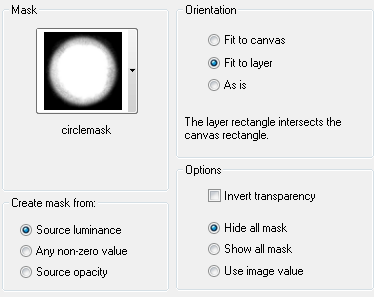
~Apply Mask = Layers>Load/savemask>Load Mask from disk. Merge Group.
~Add DS 1, -1, 50, 5.00, black.
~Copy frame1 and Paste, resize 20%
~Using Magic Wand click inside each frame
~Selections>Modify>Expand 6
~Copy Paper 10 and Paste, resize 15%
Selections>Invert, delete. Ctrl + D, move below the frame.
~Using Magic Wand click inside top left frame.
Selections>Modify>Expand 6
~Copy Panda 1 and Paste, resize 15%.
Selections>Invert, delete. Ctrl +D Add DS.
~Do the same with the other 2 frames, using Panda 3 & 5.
~Merge Layers 4, 5 & 6 together.
~Move below the frame.
~Change Blend Mode of the Panda's to Luminance(L), lower Opacity to 74.
~Add DS to Frames
~COpy Flower1 and Paste, Resize 70%.
~Apply Mura's Copies with the Following Settings.

~Move this layer above your mask layer. Add DS~Copy Flower2 and Paste, resize 40%.
~Apply Mura's Copies with same settings. Add DS, move this above flower1 layer.
~Copy bow3 and Paste, resize 25%. Add DS and move to Bottom of frames.
~Copy Panda 4 and Paste, resize 25%. Add DS, move to the Bottom of the frame.
~Copy wordart from supploes and Paste.
~Add Name and Copyright info.
~Resize and save as .png
Posted by Betty Freak at 1:42 PM 0 comments
Labels: Dazzling Scraps, PTU Tuts
Sunday, February 21, 2010
You Are Beautiful
This tutorial was written on Feb. 21St. 2010. This is my own creation using scrap kit by Stina "Ladybird Love" and Template by Toxic Desirez.♦Poser Tubes included in the Kit
Posted by Betty Freak at 11:21 AM 0 comments
Labels: Pampered Pups CT, PTU Tuts, Stina
Saturday, February 20, 2010
Princess Gorguss
I wrote this tutorial on Feb. 20th, 2010. This is my own creation, using Scrap kit Lovingly Yours by Lady Raven. Any resemblence is only coincidental. Please do not copy, this tutorial in anyway.♦Font of Choice (not sure which one I used)
Posted by Betty Freak at 1:14 PM 0 comments
Labels: Kreative Kreations Korner, PTU Tuts
Love You Always
~Copy Tube and Paste, resize 60%. Selections> Invert, delete. CTRL + D.
Posted by Betty Freak at 9:22 AM 0 comments
Labels: Kreative Kreations Korner, PTU Tuts
Sunday, February 7, 2010
Spring Is Here
This tutorial was written on Feb. 4, 2010. This is my own creation, using an outside Template and Scrapkit. Any resemblence is only coincidental. Please do not copy, this tutorial in anyway.
~Copy Flower Decoration 3 and Paste, add DS.
Posted by Betty Freak at 11:29 AM 0 comments
Labels: Dazzling Scraps, PTU Tuts
Saturday, February 6, 2010
Moraccan Nights
This Tutorial was written on Feb. 5th, 2010. This is my own creation, using Template by Elegantly Wasted and Scrap Kit by Baby Cakes Scraps.♦Font of Choice I used Al Sandra HERE
Posted by Betty Freak at 7:58 PM 0 comments
Labels: Keith Garvey, Kreative Kreations Korner, PTU Tuts
Now I lay Me Down
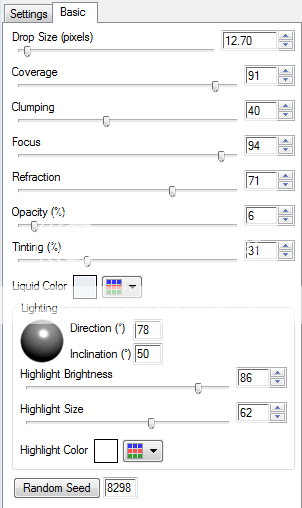
~Merge Down with other paper layer. After applying Glass effect, lower Opacity to 80.
~This will give a stained glass look.
~Add Drop Shadow to Frame 0, 0, 40, 4.00.
~Copy Paper3 and Paste above background layer, resize 70%. Appy Mask, Merge Group.
~Duplicate, Mirror and flip.
~Copy Vine and Paste, resize 15%, Add DS. Move to the Right of frame.
~Copy Lordsprayer2 adn Paste, resize 25%. Using Raster Deform Tool, turn to the left slighty. Adjust>Sharpness>Sharpen. Add DS.
~Copy Leafdeco2 and Paste, Resize 50%, Move below the scroll.
~Copy Praying1 and Paste, resize 60%. Place above scroll.
~Copy Prayer4 and Paste, resize 60%. Duplicate, move this below the frame.
~On Orginal Poser erase the legs. DO the same with the duplicated. It will look like the legs are under the frame.
~Copy Word Art and Paste and Move above the Frame Layer.
~Put name and Copyright info.
~Crop and save as .png.
Thank You for trying my tutorial.
Posted by Betty Freak at 4:28 PM 0 comments
Labels: Pampered Pups CT, PTU Tuts, Tootypup
Tuesday, January 26, 2010
After The Rain
Posted by Betty Freak at 10:11 AM 0 comments
Labels: Dazzling Scraps, PTU Tuts
Monday, January 25, 2010
Love Is the Beauty of the Soul
Posted by Betty Freak at 10:27 AM 0 comments
Labels: Kreative Kreations Korner, PTU Tuts
Friday, January 22, 2010
Princess
Posted by Betty Freak at 1:55 PM 0 comments
Labels: Kreative Kreations Korner, PTU Tuts
Wednesday, January 20, 2010
Love Is In The Air
Posted by Betty Freak at 8:42 PM 0 comments
Labels: Pampered Pups CT, PTU Tuts, Stina
Tuesday, January 12, 2010
Melt My Heart
Posted by Betty Freak at 11:13 AM 0 comments
Labels: Dazzling Scraps, Keith Garvey, PTU Tuts
Wednesday, December 23, 2009
Key To My Heart
Delete Circle.
~
Circle Line, Selections>Select All>Float>Defloat.
~
Copy Paper 7 and Paste as a New Layer. Selections> INvert, delete, Ctrl + D. Delete Circle Line.
~
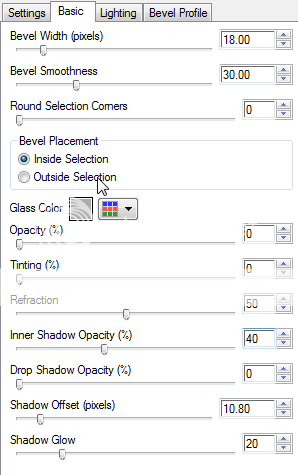
Add Gradient Glow changing glow radiues to 5.00
~
Doodle Layer, Selections>Select All>Float>Defloat.
~
Copy Paper 2 and Paste as a New Layer. Selections>INvert, delete, Ctrl + D. Add DS, Delete Doodle.
~
Add Elements of Choice, May need to rotate some of the elements. Add DS, resizing will be necessary.
~
Add Name and Copyright info.
~
Resize 400x350, save as .png. Thank You for trying my tutorial.
Posted by Betty Freak at 12:13 PM 0 comments
Labels: Dazzling Scraps, PinUpToons, PTU Tuts
Sunday, December 13, 2009
I Know You Want Me
Posted by Betty Freak at 9:41 PM 0 comments
Labels: Dazzling Scraps, Keith Garvey, PTU Tuts
Saturday, November 21, 2009
Autumn Beauty
Posted by Betty Freak at 4:56 PM 0 comments
Labels: Dazzling Scraps, PinUpToons, PTU Tuts
Monday, November 2, 2009
Forever Autumn
Posted by Betty Freak at 10:49 AM 0 comments
Labels: Dazzling Scraps, Joel Adams, PTU Tuts